Save 2+ Hours Each Day
Give your front desk team their time back. Intiveo takes care of the repetitive communication that slows teams down — from confirmations and reminders to recalls and post-op instructions.

Integrated call management that works with the phone provider you already trust — no vendor lock-in.
Intiveo Voice integrates with 12+ VoIP systems — including RingCentral, AT&T, Zoom, and TELUS — to simplify call workflows, helping you increase operational efficiency and reduce missed opportunities.


Built specifically for dental practices — and trusted by 14,000+ dental care providers — Intiveo’s patient engagement software offers flexible automation, integrated call management, industry-leading security, and workflows that reduce admin work.
"It gives us easier access to our patients and helps us communicate with them more effectively and in a timely manner. The Callback Tasks feature is very helpful for us because we do get busy and if we miss a call, it pulls in the information, allowing us to quickly check and follow up."
- Kenya Chambers, Lakeside Implant & Oral SurgeryGive your front desk team their time back. Intiveo takes care of the repetitive communication that slows teams down — from confirmations and reminders to recalls and post-op instructions.
Intiveo Voice brings call management directly into your workflows with features like click-to-call, extension filtering, missed-call texts and one-click access to essential contact details.
With dental-specific workflows and full HIPAA/PIPEDA compliance, Intiveo adapts to the way dental practices actually operate, eliminating workarounds and giving teams a system that finally fits.
Work with the systems you already use. Integrating your practice management software with Intiveo creates a smoother experience with automatic contact syncs, real-time updates and more.
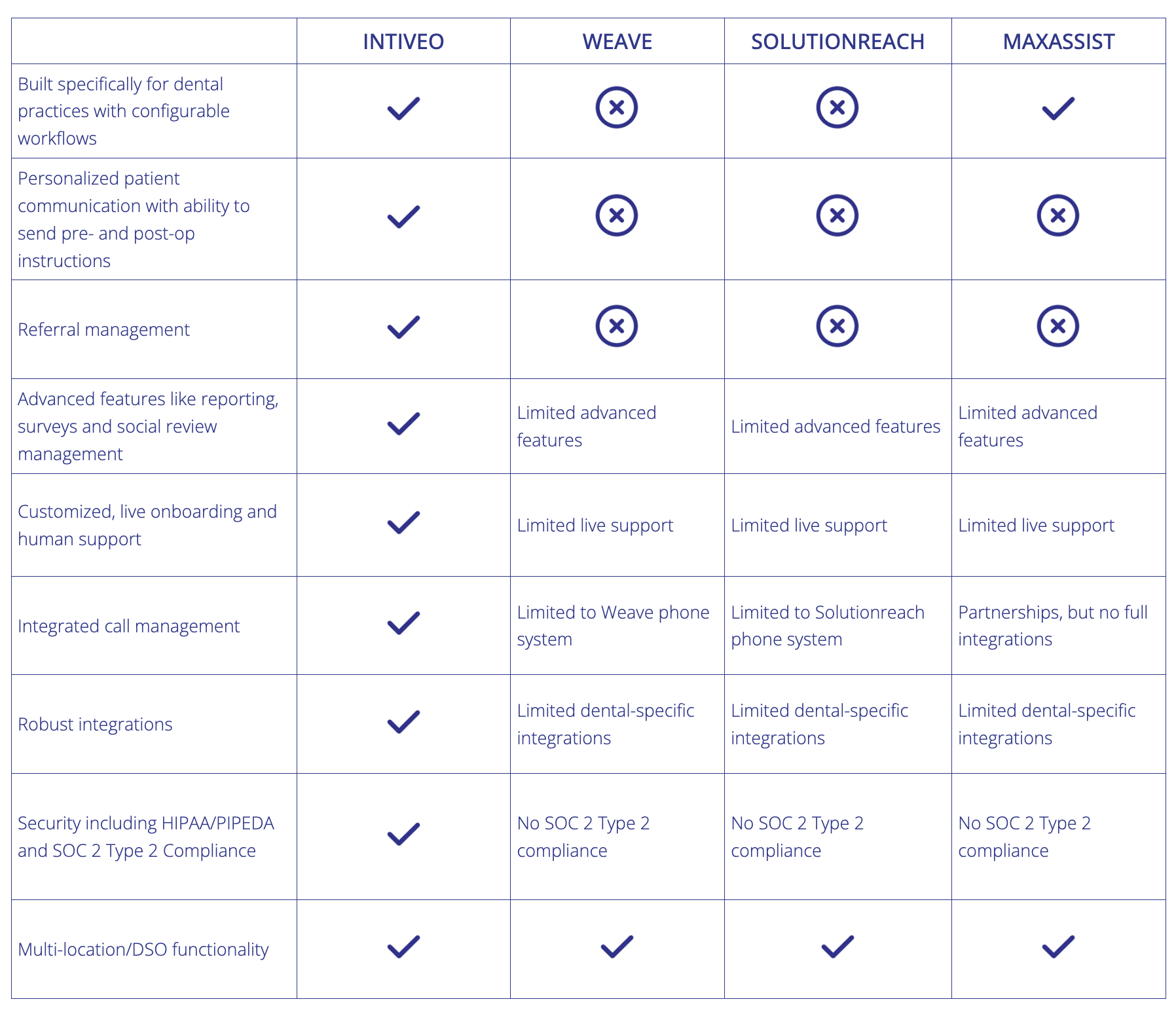
| Intiveo Voice | Other solutions | |
|---|---|---|
| Built specifically for dental practices with configurable workflows | Included | Not available |
| Robust integrations with no vendor lock-in | Included | Not available |
| Connected patient engagement experience | Included | Limited Basic features like call pop and Caller ID only |
| Customized, live onboarding and human support | Included | Limited Limited live support |
| Security including HIPAA/PIPEDA and SOC 2 Type 2 Compliance | Included | Partial Many lack SOC 2 Type 2 Compliance |
| Multi-location/DSO functionality | Included | Varies Varies based on vendor |
.png?width=1848&height=2000&name=Celebration_2%20(1).png)
Locate patients by name, phone number, or other details instantly.
Initiate calls directly from Intiveo’s platform, reducing dialling errors and saving time.
When a patient, referring office or other contact calls, Intiveo recognizes them and displays relevant information.
One-click access to essential contact details, workflows, and tools based on contact type.
Automatically log inbound/outbound calls, voicemails, and follow-up actions.
Automatically send patients a text when a call is missed to reduce lost revenue opportunities.
Use a unique phone number per office location, or a central phone number with extensions per location. Filter which location’s calls show up in which instance of Intiveo.
Assign multiple phone numbers to one extension to receive and track inbound calls, and call outbound from multiple phone numbers but appear as one unified patient-facing number.
Keep sensitive call logs private by excluding or limiting access based on phone number for added security.
Link multiple phone accounts from different providers to one Intiveo multi-location account, or link the same phone account to multiple Intiveo single-location accounts.
See all upcoming appointments for a patient regardless of location. Appointments, referrals and tasks will be tagged with the location name and filterable.
At Intiveo, we are committed to supporting you through a successful onboarding so you can see value from your purchase right away. That’s why we offer a guarantee on our software. Receive a full refund within 60 days of purchase. Please see Terms & Conditions for details regarding the Intiveo Guarantee.